
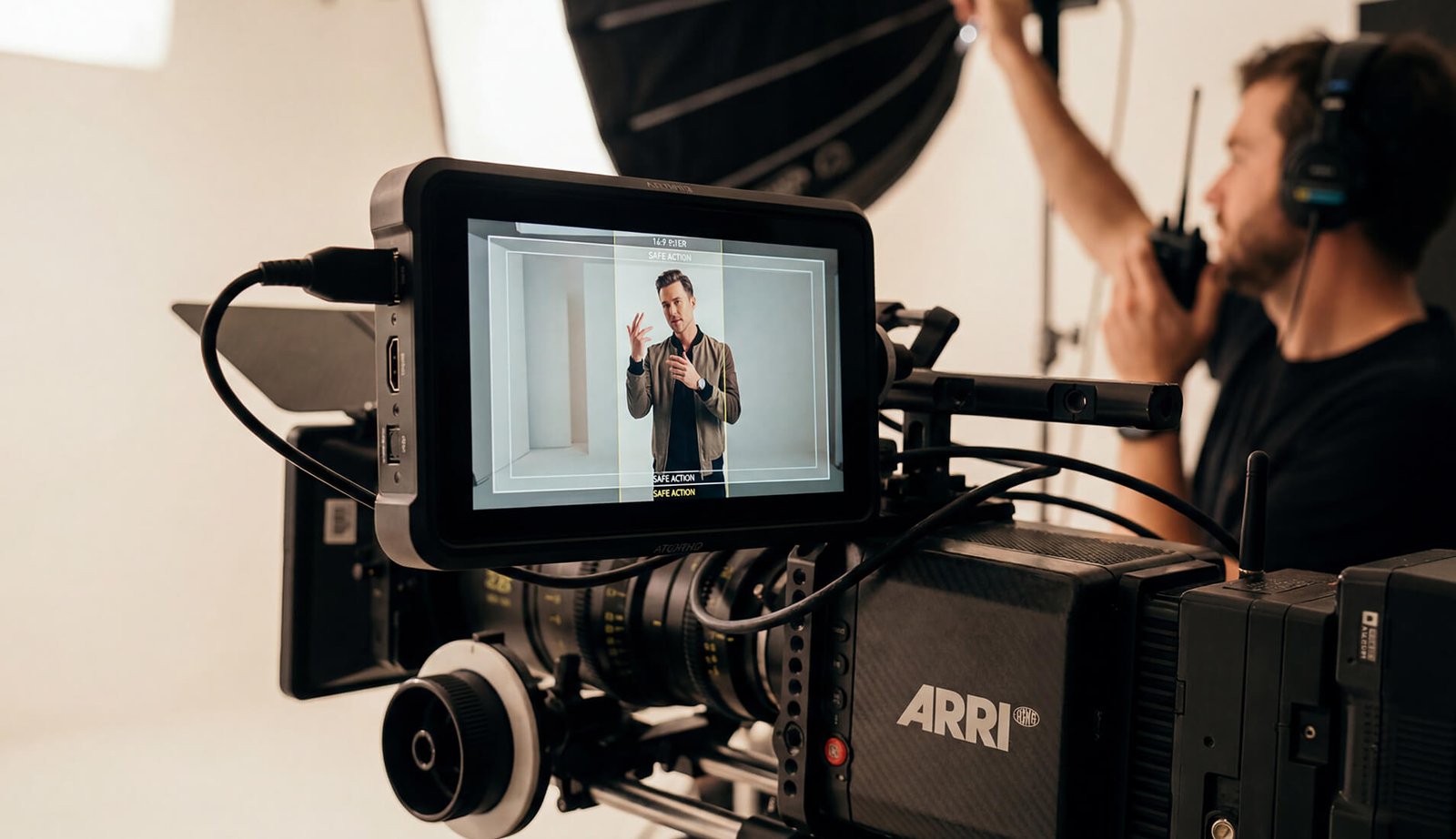
Vertical is the default now — but vertical-only can quietly break your website, YouTube, pitch decks, and future campaign assets. If you don’t protect widescreen on shoot day, you’re making a short-term decision that limits how far your content can travel.
Vertical-first is smart.
Vertical-only is expensive.
WHY VERTICAL-ONLY SHOOTS CREATE PROBLEMS LATER
Social platforms reward vertical video. That’s not up for debate. But most brands still rely on widescreen formats for website heroes, long-term content, sales decks, and internal communications .
When everything is captured vertical-only, widescreen becomes a compromise instead of a foundation.
MYTH VS REALITY
- Website hero sections
- YouTube and long-form content
- Sales decks and investor presentations
- Internal communications and future reuse.
The issue isn’t vertical. The issue is planning for only one format.
THE BIGGEST MISCONCEPTION ABOUT SHOOTING VERTICAL
We’ll just shoot and crop later.
Cropping is not a strategy. It’s a fallback.
This sounds efficient–until it isn’t. Cropping only works when composition, blocking, and eyelines were designed for it from the start.
Real-world cost: when a vertical-only interview later needs to become a website hero, YouTube opener, or investor deck cutdown, you’re either stretching a crop (soft image, awkward framing) or reshooting. Planning a 16:9 master with a vertical-safe corridor keeps options without adding shoot-day time.
A BETTER WAY TO THINK ABOUT MULTI-FORMAT SHOOTS
16:9 Is the Master, Not the Afterthought
Your widescreen master is what anchors premium brand storytelling, it’s the version that lives longest and travels furthest–across web, long-term, and future use.
Vertical Moments Are Designed, Not Salvaged.
Instead of forcing vertical out of widescreen later, a smarter approach is to plan specific moments that naturally live inside a vertical-safe zone.
On set, monitor a 9:16 guide overlay inside your 16:9 frame (a centered “corridor”). Block talent, hands, products, and eyelines inside that zone–and leave extra room low in frame if captions are expected.
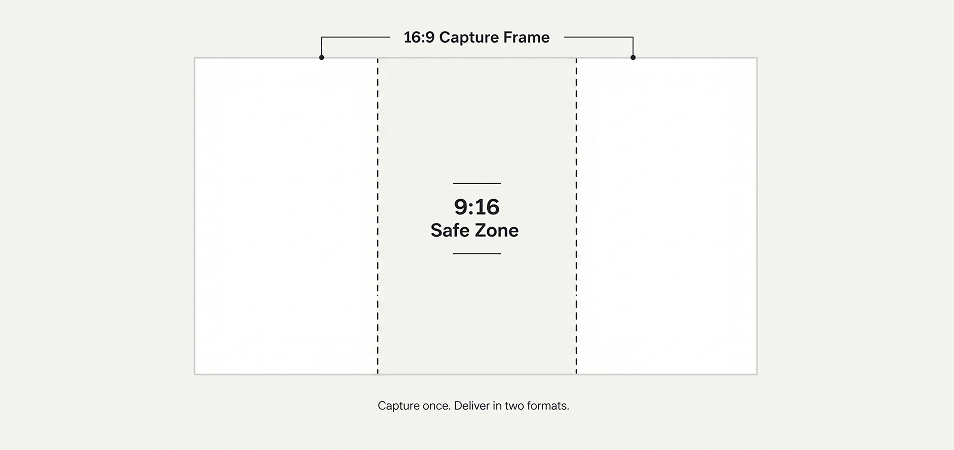
Diagram : 16:9 frame with centered 9:16 safe area + optional caption lane.
Protect the widescreen master. Design the vertical safe zone. Avoid rescue work in post.
WHAT HAS TO BE TRUE ON SET
When these principles are respected, both formats stay clean:
- Important action stays centered
- Eyelines remain controlled
- Hands, products, and gestures stay in the vertical-safe area
- Frame edges are treated as optional
- Space is preserved for captions and overlays.
WHAT THIS LOOKS LIKE IN PRACTICE
Founder intro paired with a product demo.
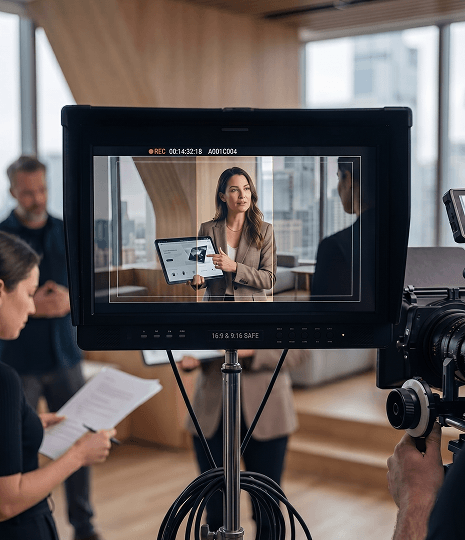
One setup. The founder is staged in the center corridor. The product demo happens within the vertical-safe area. Eyelines stays disciplined.
Two intentional moments are captured specifically for social:
- A product interaction beat
- A delivery beat tied to a key message
(Behind-the-scenes still or frame grab showing center-corridor composition). One setup. Two formats. No compromises.
A SIMPLE SHOOT-DAY CHECKLIST
Use this on any production that needs to live on both web and social:
- Vertical safe area visible on monitor
- Eyes remain within the safe zone
- Hands, products, and gestures centered
- Nothing critical living at frame edges
- At least one take designed specifically for vertical
CLOSING
Vertical doesn’t have to cost you widescreen quality–but only if it’s planned from the start. When you protect a strong 16:9 master and design vertical moments intentionally, your content says premium everywhere it shows up.
Planning a multi-format shoot? We’ll build a vertical-safe shot plan around your 16:9 master– so you leave set with premium assets for web, YouTube, decks, and social.
FAQs
1. What is a 9:16 safe are inside a 16:9 frame?
It’s the centered portion of a widescreen frame that can be cropped to vertical without cutting off faces, hands, products, or key text.
2. Should you shoot 16:9 or 9:16 first?
Capture a strong 16:9 master first, then design specific moments to live inside the vertical-safe corridor. That keeps web and long-form premium while still feeding social.
3. Can you just crop 16:9 into 9:16 later?
Sometimes—but only if framing, eyelines, and blocking were built for it. If not, the crop feels compromised and often triggers extra post work or reshoots.
4. What framing mistakes break vertical crops?
Talent drifting to the edge, products held outside the center corridor, wide gestures that live at frame edges, and critical on-screen text placed where captions will cover it.
5. What’s the simplest way to implement this on set?
Enable 9:16 guides on your monitor, stage action in the center corridor, and capture at least one intentional take designed specifically for vertical.